

Beat complexity.
Design freely.
BeatDesign brings Studio, Canvas, Editor, and Assets into one local project — start ideas, explore branches, shape the cut, and keep everything together.

One project from idea to export
The browser is your studio: every view works on the same local project, from the first prompt to the final cut.
01
Studio · Start
Start from a prompt or local media. Studio maps the first generation.
02
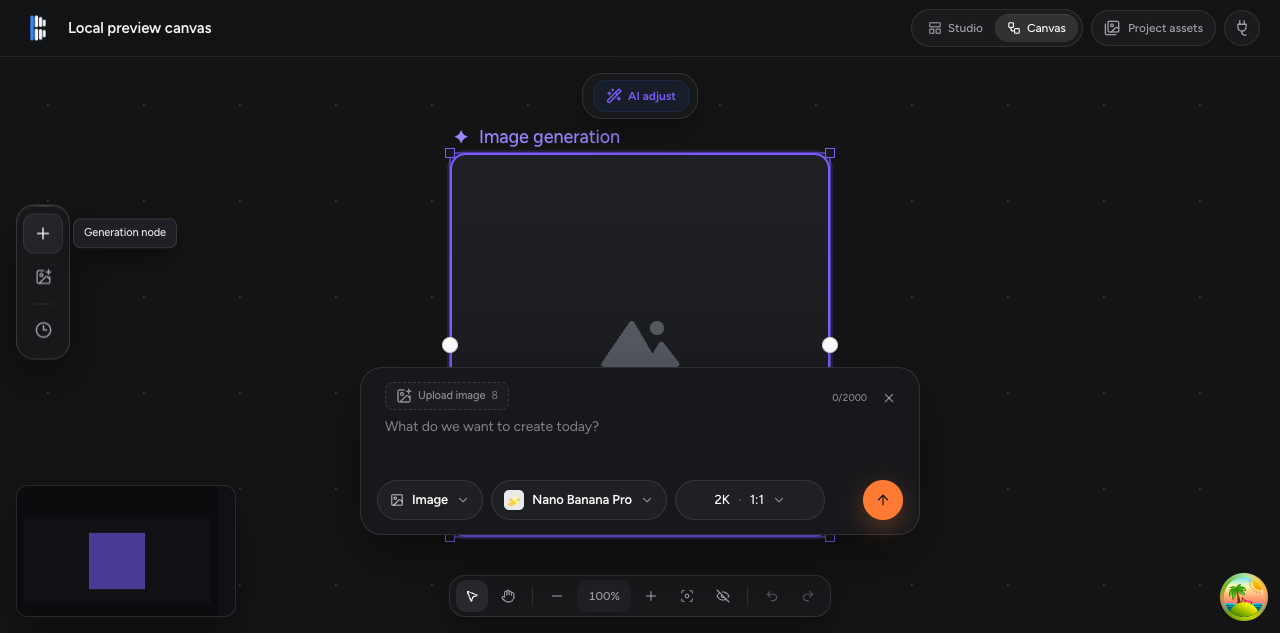
Canvas · Branch
Branch ideas, attach references, and keep every output in the project.
03
Assets · Library
Images, video, audio, clips, and renders share one local library.
04
Editor · Timeline
Trim, split, mix, and redo a range with AI. Export MP4 in-browser.
05
Agent · Any MCP host
Let any agent discover Skills, read the project, and apply stable commands through 29 local tools.
Infinite canvas, branching ideas
Keep every direction visible and every output connected. Your generation history stays with the project, not in a chat log.
- Image, video, audio, timeline, and text-oriented canvas nodes
- Model and parameter selection from one code-defined BeatAPI catalog
- Standard and deep video analysis, with results back on the canvas
A real timeline editor
Move from generated idea to finished cut in the same workspace. Drag a clip onto the timeline and start shaping it.
- Drag-to-trim, split, move, and ripple delete; undo and redo
- Audio volume and fades; selected-range AI redo as non-destructive Takes
- Timeline diagnostics for gaps, overlaps, missing media, and duration mismatches
- Browser-side H.264/AAC MP4 export — no system FFmpeg; renders return to Assets
Timeline shown schematically; see the repository for current screenshots
Agent-ready when you need it
BeatDesign keeps the project understandable to both you and your agent. Discover bundled Skills, read local state, apply stable commands, and render the authoritative timeline without automating UI pixels.
pnpm devVisual workspace — Studio, Canvas, Editor, and Assets in the browserpnpm --silent mcpLocal control plane over stdio for coding agentspnpm --silent mcp:httpHTTP connector for QwenWork and Doubao WorkWorks with Claude Code, Codex, Cursor, and other MCP hosts; the repository includes a root .mcp.json. UI and MCP share the same project services, revisions, and stable commands.
Why creators leave subscriptions behind
| Subscription AI tools | Traditional editors | BeatDesign | |
|---|---|---|---|
| Cost | Monthly subscription, billed even in idle months | One-time license, steep learning curve | Free local workspace; remote generation follows provider pricing |
| Your media | Locked in the vendor's browser | Local, but no generation | Local SQLite project plus generation |
| Agent control | None — closed GUI | None | 29 MCP tools on the same project |
| Model choice | Vendor-locked | Not applicable | Built-in BeatAPI provider; explicit adapter extension point |
Made for everyday AI creation
Ecommerce & ads
Turn one product photo into hooks, variants, and 9:16 ad cuts — unreleased products never leave your machine.
Designers & brands
Reference-driven generation with project-level assets; history is a fork tree, not a chat log.
Short video & drama
Storyboard on the canvas, cut in the 15–60s timeline, and mix local footage with generated shots.
AI builders
Embed generation into agent workflows — import media, rewrite prompts, place clips, export.
Run it locally
git clone https://github.com/BeatAPI/BeatDesign.git
cd BeatDesign
pnpm install
pnpm db:push
pnpm dev   # http://127.0.0.1:3020
FAQ
Is BeatDesign free?⌄
Yes. The local workspace is Apache-2.0 open source with no account system, subscription, or local credit ledger. Remote generation is billed under the terms of the provider you connect.
Do I need a BeatAPI key?⌄
Not for local work. Import, canvas work, editing, preview, and MP4 export run without one. The official built-in provider uses your BeatAPI key only for generation, video analysis, or AI redo.
Can I use another generation provider?⌄
BeatAPI is the built-in and default provider. The provider contract, logical model IDs, and adapter registry are explicit extension points, so a fork can register another provider without changing Canvas, Asset, Editor, or MCP contracts. The official release does not yet ship a provider marketplace.
Which agents can drive it?⌄
Any MCP host: Claude Code, Codex, and Cursor connect over local stdio; QwenWork and Doubao Work use the local HTTP endpoint.
Where does my media live?⌄
On your disk. A project is one local folder with a SQLite database; only a generation, analysis, or AI-redo request you confirm is sent to the configured provider.
What can I export?⌄
Browser-side H.264/AAC MP4 exports — no system FFmpeg — and finished renders return to the project asset library. MCP can also render the authoritative saved timeline locally when ffmpeg and ffprobe are available.
What is the current state?⌄
v0.2.2 is available as a GitHub Release and still runs from source with pnpm dev. There is no desktop installer or hosted editor. Subtitle tracks, SRT import, image overlays, and authoritative MCP timeline rendering are available; transcription, transitions, and waveform editing are still planned.
Star the repo. Start creating locally.
BeatDesign is an open-source local workspace. BeatAPI is the official built-in generation provider, and the provider adapter remains an explicit extension boundary.